Passport and travel documents for Singapore Arrival Card application

How to Apply for the Singapore Arrival Card β€” Step-by-Step with Screenshots

Visual walkthrough of every field in the official ICA online form β€” complete with real screenshots, tips and common mistakes to avoid.

Start Tutorial ↓ Open ICA Portal →
📋 Quick Summary: The Singapore Arrival Card (SGAC) is a free, mandatory online form submitted at eservices.ica.gov.sg/sgarrivalcard/. It takes 5–10 minutes and must be submitted within 3 days before arrival. You need your passport, flight details, Singapore accommodation address, and contact information.

Before You Start β€” What You Need

Gather these documents before opening the ICA portal. The form does not save progress β€” completing it in one session takes 5–7 minutes.

  • 🛂 Valid passport β€” number, expiry date, nationality
  • Flight details β€” flight number, arrival date
  • 🏠 Singapore accommodation β€” hotel name and address or postal code
  • 📞 Contact details β€” email address, mobile number with country code
  • 🏥 Health info β€” whether you have fever/cough/symptoms in past 14 days
⏰ SGAC Key Facts
CostFREE ($0) β€” never pay
Submit windowUp to 3 days before arrival
Time to complete5–10 minutes
Official URLeservices.ica.gov.sg/sgarrivalcard/
Who must applyAll foreign visitors to Singapore
ConfirmationEmail + QR code (no printout needed)

Step-by-Step Tutorial β€” ICA SGAC Form Walkthrough

All screenshots taken from the official ICA e-Service portal. Click any image to view full size.

1

Open the Official ICA Portal

Go to https://eservices.ica.gov.sg/sgarrivalcard/ in your browser. This is the only official Singapore Arrival Card portal β€” it is operated by the Immigration & Checkpoints Authority (ICA) of Singapore.
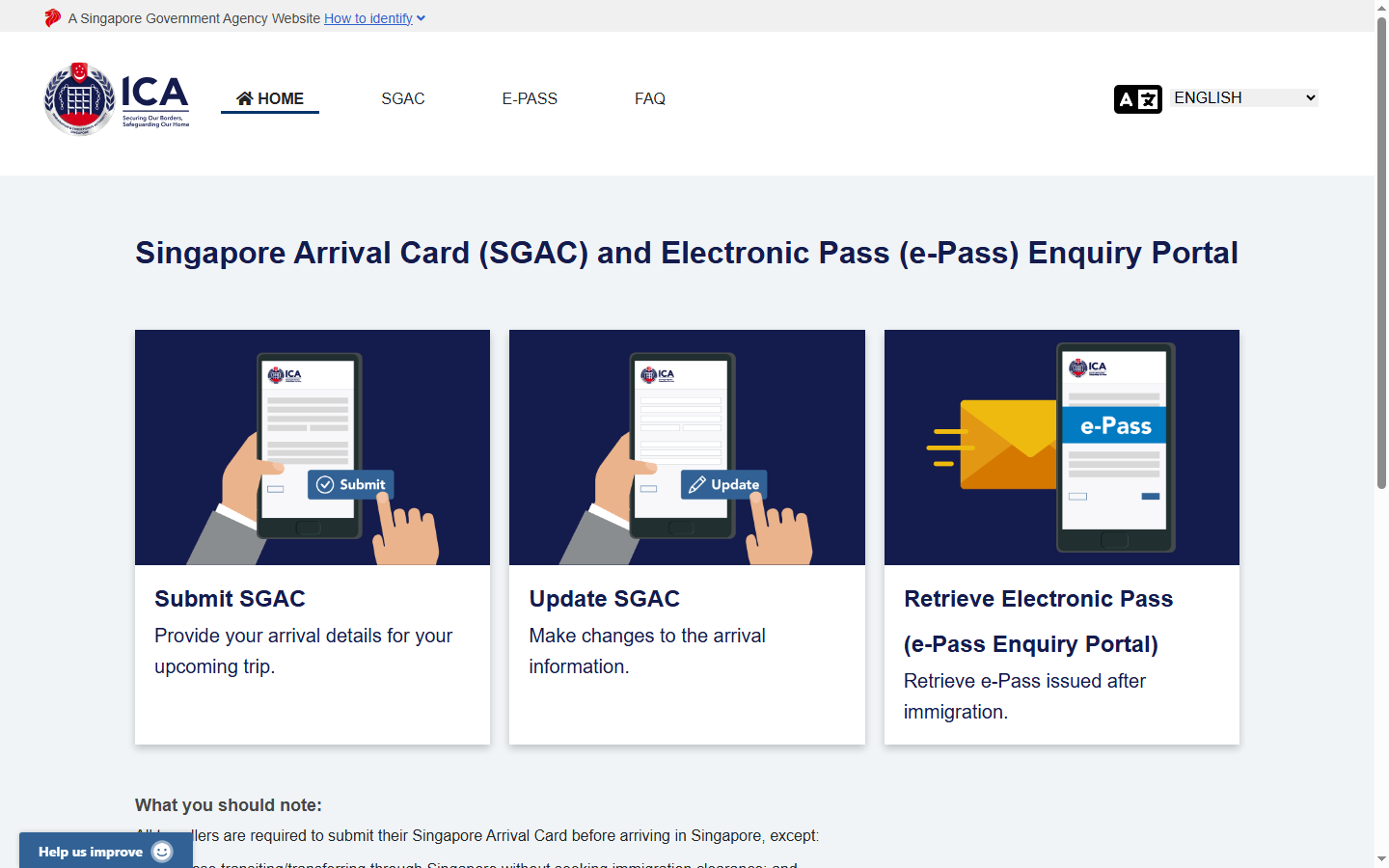
ICA Singapore Arrival Card portal homepage β€” official landing page
The official ICA Singapore Arrival Card portal homepage. Click Submit SGAC to begin your application.
⚠ Scam Warning: Only use the official ICA URL above. Third-party websites charging fees for SGAC submission are scams β€” the government service is 100% free. Learn more about SGAC scams →

On the homepage, click the large "Submit SGAC" button (the leftmost card with the airplane icon) to start a new submission.

2

Select Residency Type β€” Choose "Foreign Visitor"

Select your traveller category. The ICA portal shows three residency types. Foreign tourists and short-term visitors should select the third option: "Foreign Visitor / In-Principle Approval Holder".
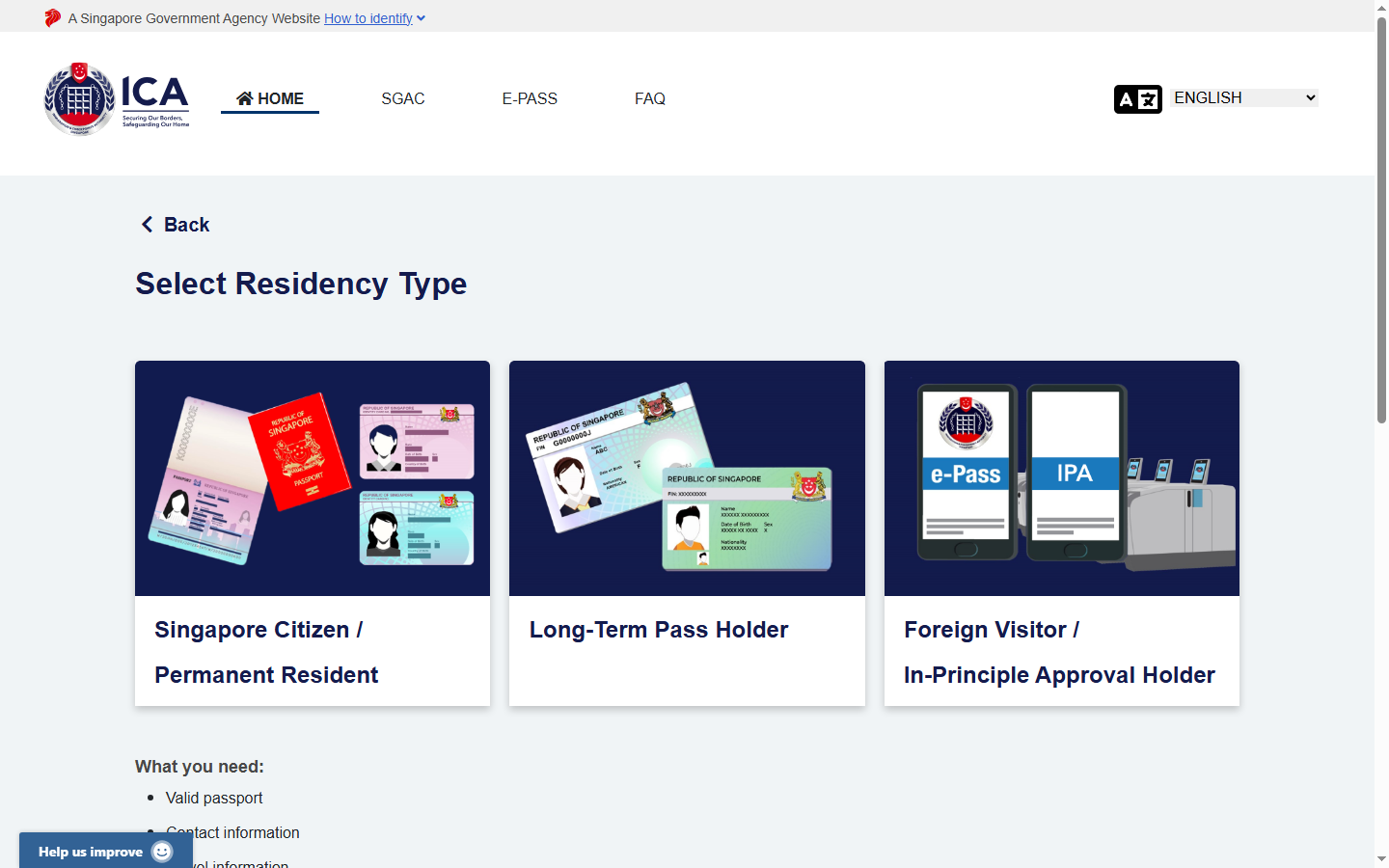
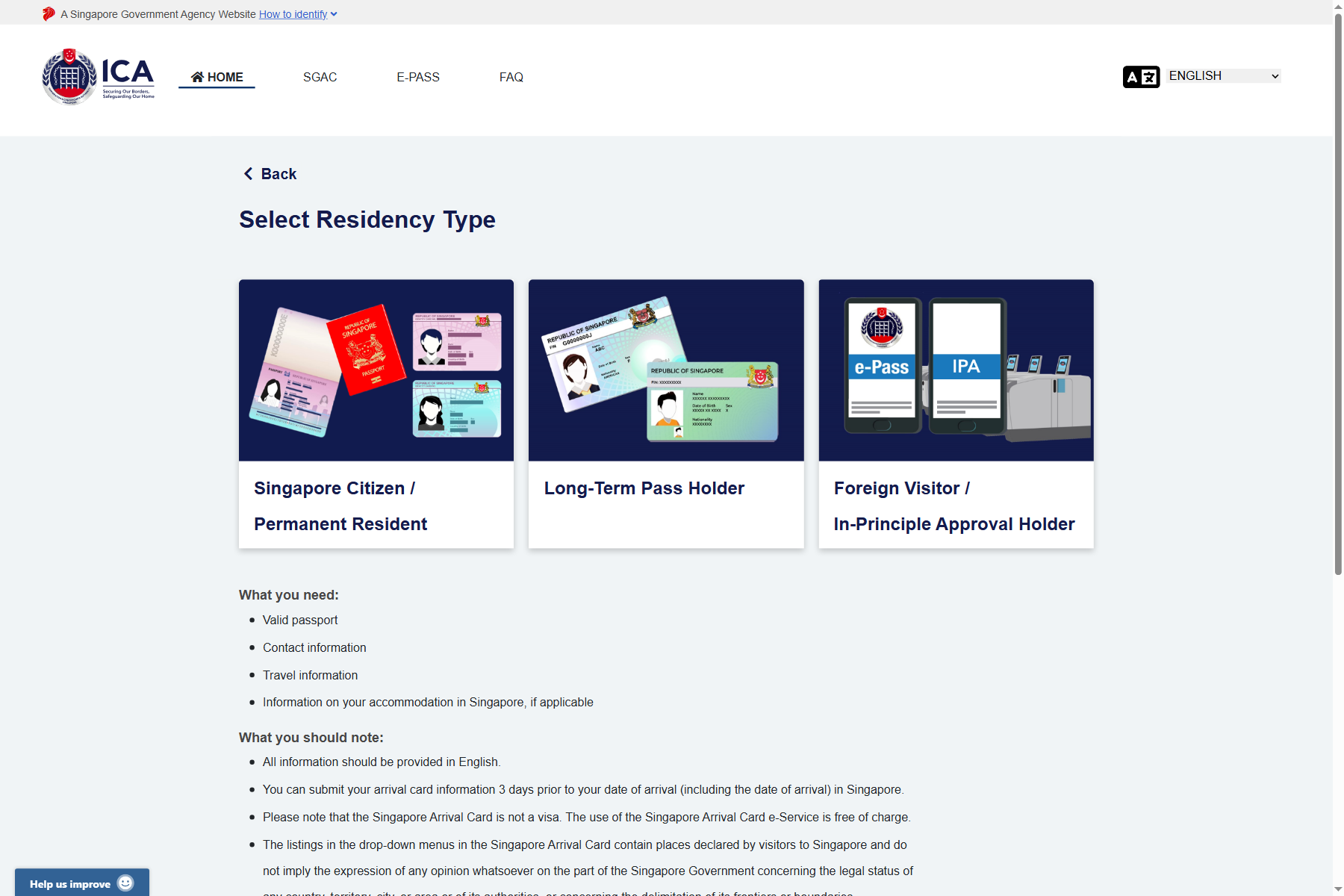
ICA SGAC Select Residency Type page showing three options
The "Select Residency Type" page. Foreign tourists must click the third card β€” "Foreign Visitor / In-Principle Approval Holder".
Option Who it's for
Singapore Citizen / Permanent Resident SC/PR returning to Singapore
Long-Term Pass Holder EP, S Pass, Work Permit, Student Pass holders
Foreign Visitor / IPA Holder βœ“ Tourists, business visitors, transit passengers β€” most travelers
Foreign Visitor In-Principle Approval Holder card on ICA SGAC form
Click the "Foreign Visitor / In-Principle Approval Holder" card to proceed.
3

SGAC Form Overview β€” 4 Steps Total

The SGAC form for Foreign Visitors has 4 stages: Traveller Information β†’ Trip Information β†’ Review β†’ Confirmation. You'll now begin filling in Step 1.
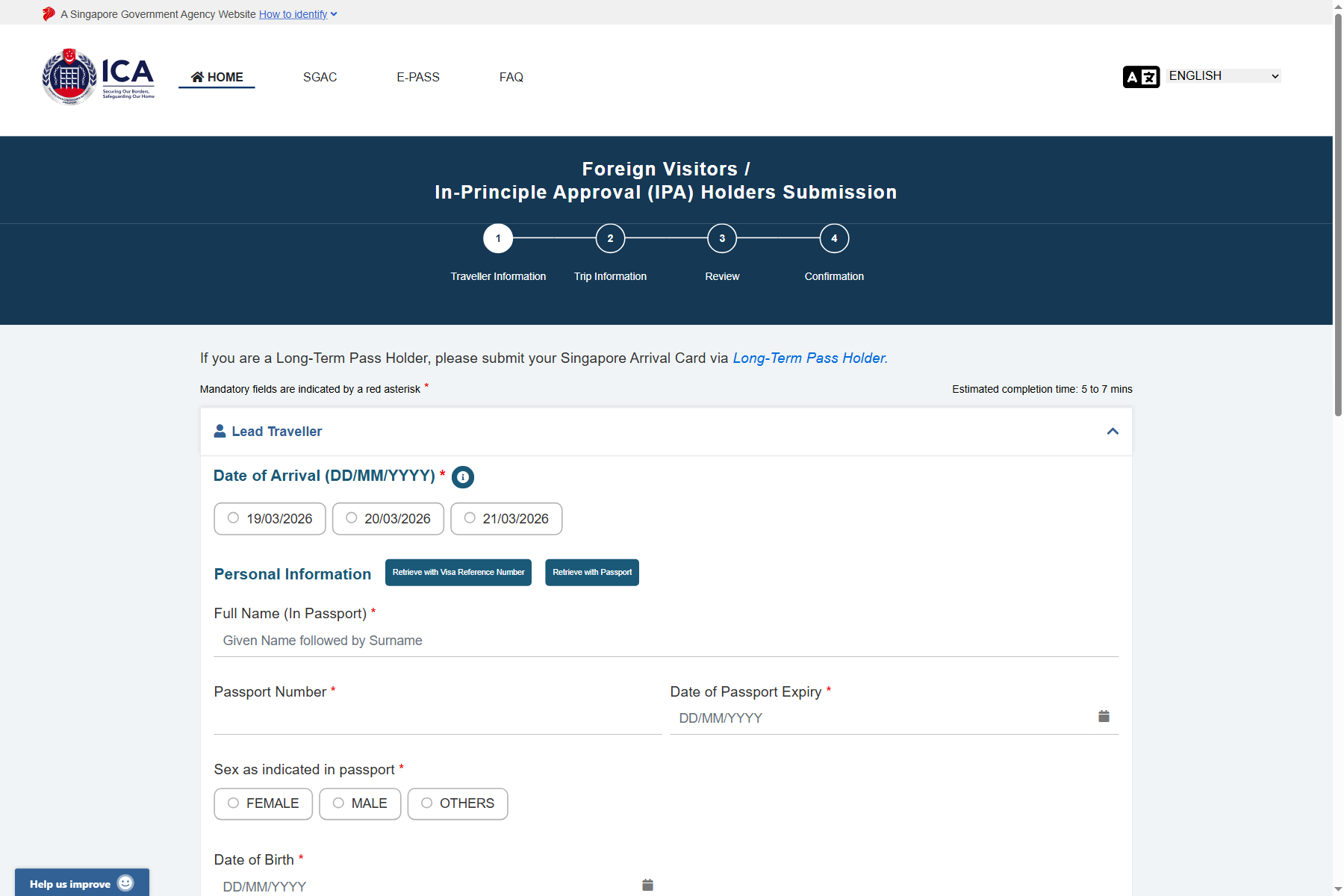
SGAC Traveller Information form step 1 β€” empty form overview
Step 1 of 4: Traveller Information. All fields marked with a red asterisk (*) are mandatory.
💡 Tip: All information must be entered in English exactly as it appears in your passport. Do not use nicknames or abbreviated names.
4

Field: Date of Arrival

Select your planned date of arrival in Singapore. The ICA portal displays the next 3 available dates as clickable buttons. You can submit the SGAC up to 3 days before your arrival (including the arrival day itself).
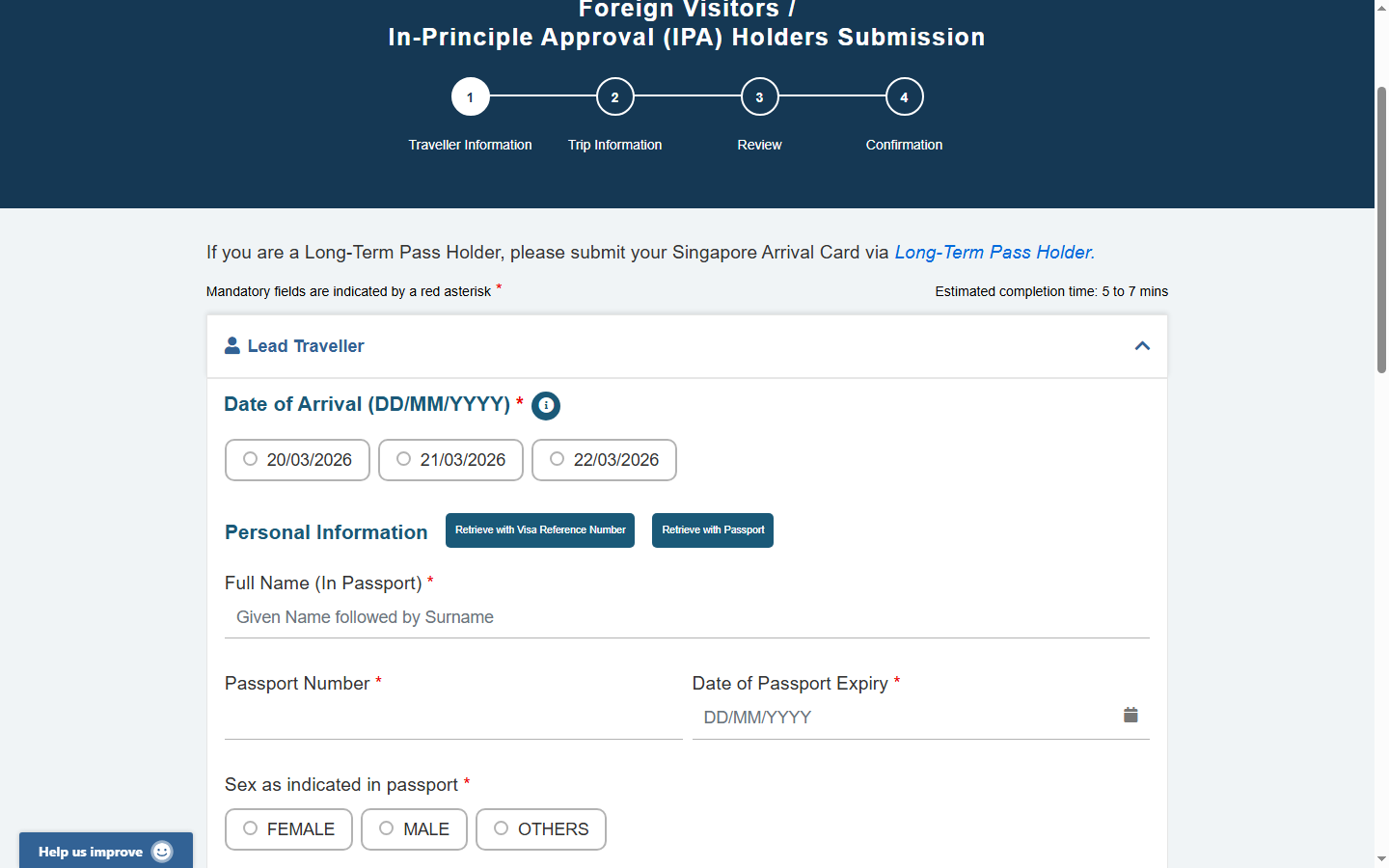
Date of Arrival field on the SGAC form showing 3 date options
The Date of Arrival field shows the next 3 eligible dates. Click your actual arrival date.
📅 Timing Tip: The ICA portal only shows dates within the 3-day window. If your arrival is more than 3 days away, return closer to your travel date. The ideal time to submit is 24–48 hours before departure.
5

Field: Full Name (In Passport)

Enter your full name exactly as printed in your passport. The system uses a single "Full Name" field. Enter your given name(s) first, followed by your surname β€” in the same order as your passport.

Full Name field empty on SGAC form
Full Name field β€” empty. Placeholder text: "Given Name followed by Surname".
Full Name field filled with JOHN DOE on SGAC form
Full Name field β€” filled. Example: JOHN DOE (given name + surname in CAPS as in passport).
🛂 Passport Rule: Copy the name character-for-character from your passport's machine-readable zone (MRZ) or the biographical data page. If your passport shows "JOHN WILLIAM DOE", enter all three names. Avoid punctuation unless your passport contains it.
6

Field: Passport Number

Enter your passport number exactly as printed β€” including any letters. This is the alphanumeric code on the biographical data page (the page with your photo).


Passport Number field empty on SGAC form
Passport Number field β€” empty.
Passport Number field filled with sample number A12345678
Passport Number field β€” filled. Example: A12345678.
⚠ Common Mistake: Do not confuse the passport number with the visa number or national ID number. The passport number is typically 6–9 characters and printed at the top of the biographical data page. Enter it in UPPERCASE without spaces.
7

Field: Date of Passport Expiry

Enter the expiry date of your passport in DD/MM/YYYY format. Singapore requires passports to be valid for at least 6 months beyond the intended stay.


Passport Expiry Date field empty on SGAC form
Passport Expiry Date β€” empty. Format: DD/MM/YYYY.
Passport Expiry Date field filled on SGAC form
Passport Expiry Date β€” filled. Example: 19/03/2031.
📅 6-Month Rule: Your passport must be valid for at least 6 months from your date of arrival in Singapore. If your passport expires sooner, you must renew it before travel. Check your passport expiry date carefully.
8

Field: Sex as Indicated in Passport

Select your sex as it appears in your passport β€” FEMALE, MALE, or OTHERS. This must match your passport exactly. The ICA form uses three clearly labelled buttons.
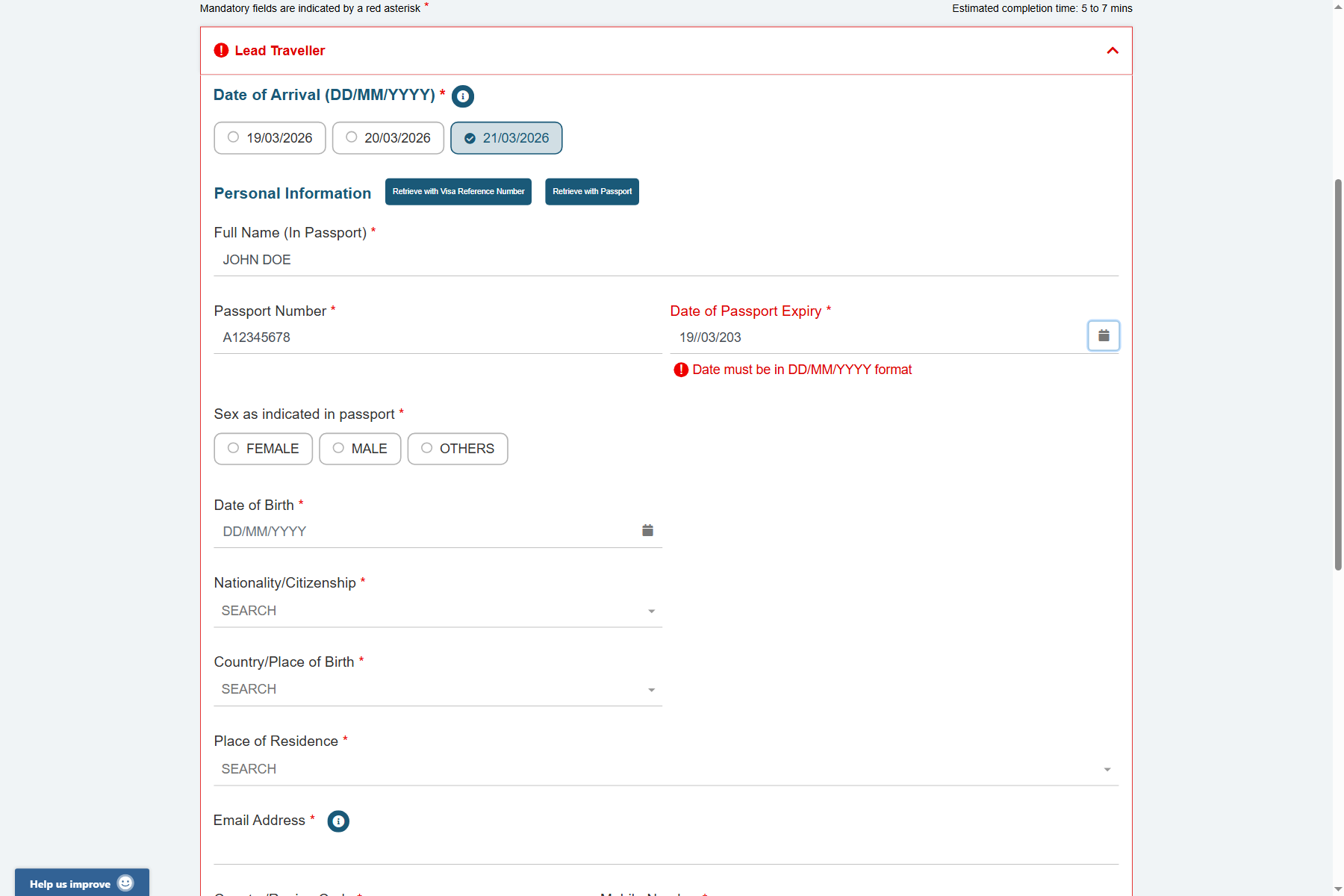

Sex selection field on SGAC form showing FEMALE MALE OTHERS buttons
Sex field β€” three options: FEMALE, MALE, OTHERS. Click the one matching your passport.
MALE selected in the Sex field on SGAC form
Sex field β€” MALE selected (highlighted button).
9

Field: Date of Birth

Enter your date of birth in DD/MM/YYYY format β€” exactly as printed in your passport. This field is mandatory and used for identity verification.

Date of Birth field empty on SGAC form
Date of Birth field β€” empty. Format: DD/MM/YYYY (e.g., 15/03/1985).
Date of Birth field filled with 15/03/1985 on SGAC form
Date of Birth field β€” filled. Example: 15/03/1985.
10

Field: Nationality / Citizenship

Type your nationality in the search box and select from the autocomplete dropdown. This is a searchable field β€” start typing your country name (e.g., "Malaysia") and select the matching result.

Nationality Citizenship field empty on SGAC form with SEARCH label
Nationality/Citizenship field β€” empty. Type to search. A dropdown will appear.
Nationality field filled with MALAYSIAN on SGAC form
Nationality β€” MALAYSIAN selected from dropdown. The official ICA term may differ from country names.
🔍 Search Tip: Type the first 3–4 letters of your nationality (e.g., "GERM" for German, "BRIT" for British, "MALAY" for Malaysian). If the exact term doesn't appear, try typing your country name differently β€” the ICA uses official nationality terminology which may differ from common usage.
11

Field: Country / Place of Birth

Type and select your country of birth from the searchable dropdown. This refers to the country where you were born β€” it may differ from your current nationality.

Country Place of Birth field empty on SGAC form
Country/Place of Birth β€” empty search field.
Country of Birth filled with MALAYSIA on SGAC form
Country of Birth β€” MALAYSIA selected.
12

Field: Place of Residence

Select your current country β€” and optionally region β€” of residence. This is where you currently live, not your nationality. The field is hierarchical: after selecting a country, it may ask for a region or city.


Place of Residence field empty on SGAC form
Place of Residence β€” empty search field. Type your country of residence.
Place of Residence filled with Malaysia region on SGAC form
Place of Residence β€” fully selected including country and region (e.g., MALAYSIA, JOHOR).
13

Field: Email Address

Enter a valid email address where you want to receive your SGAC confirmation. Your acknowledgement email with a QR code will be sent here. Use an address you can access during travel.


Email Address field empty on SGAC form
Email Address field β€” empty. This email will receive your SGAC confirmation.
Email Address field filled with john.doe@gmail.com on SGAC form
Email Address β€” filled. Confirmation email with QR code will be sent here.
📧 Email Tip: Use a Gmail, Outlook, or other major email provider. Some corporate email servers may filter automated messages from ICA. After submission, check your spam/junk folder if the confirmation doesn't arrive within 30 minutes.
14

Field: Mobile / Phone Number

Enter your international mobile phone number. The form has two fields: the country/region dialling code (without the + sign) followed by your mobile number digits.


Phone number section with country code and mobile number fields empty on SGAC form
Phone section β€” two fields: Country/Region Code + Mobile Number.
Mobile number field filled on SGAC form
Mobile Number filled β€” example: 60 (Malaysia code) + 123456789.
📞 Country Codes: Enter only the digits of the country code β€” without the + sign. Examples: Malaysia = 60, UK = 44, USA = 1, Germany = 49, Australia = 61, India = 91.
15

Field: Previous Passport Under Different Name

Answer whether you have previously entered Singapore using a passport with a different name. For first-time visitors or those who have not changed their name, answer NO.
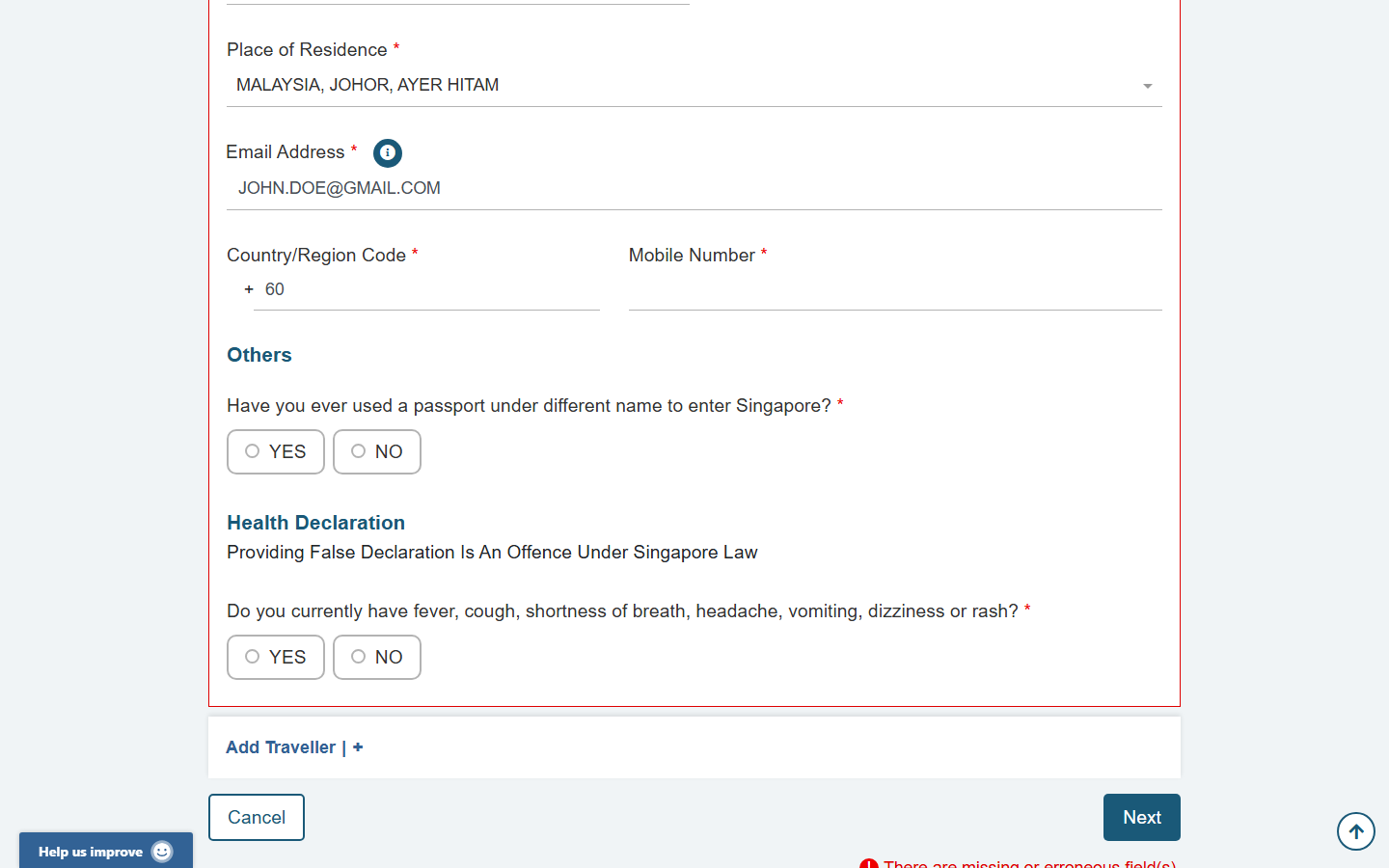
Have you used a passport under different name field on SGAC form showing YES NO buttons
"Different passport name" question β€” most travellers select NO. Select YES only if you legally changed your name since a previous Singapore visit.
💡 When to select YES: If you previously visited Singapore under a different name (e.g., after marriage, legal name change, or asylum/refugee name change), select YES. You will be asked to provide details of your previous name and passport.
16

Health Declaration β€” Electronic Health Declaration Card (eHDC)

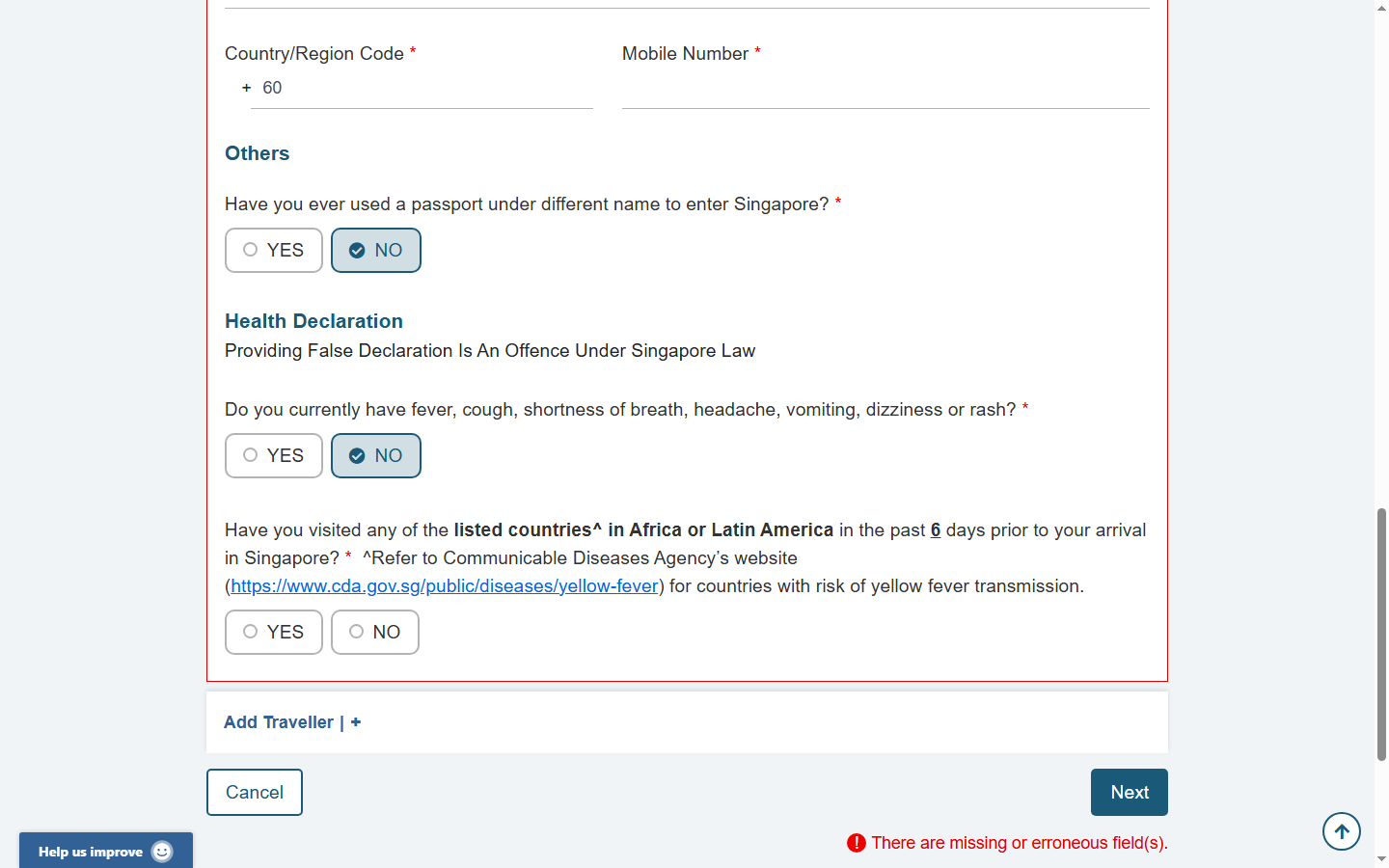
Complete the Health Declaration section β€” this is the electronic Health Declaration Card (eHDC) integrated into the SGAC. Declare honestly whether you currently have fever, cough, shortness of breath, headache, vomiting, dizziness, or rash.
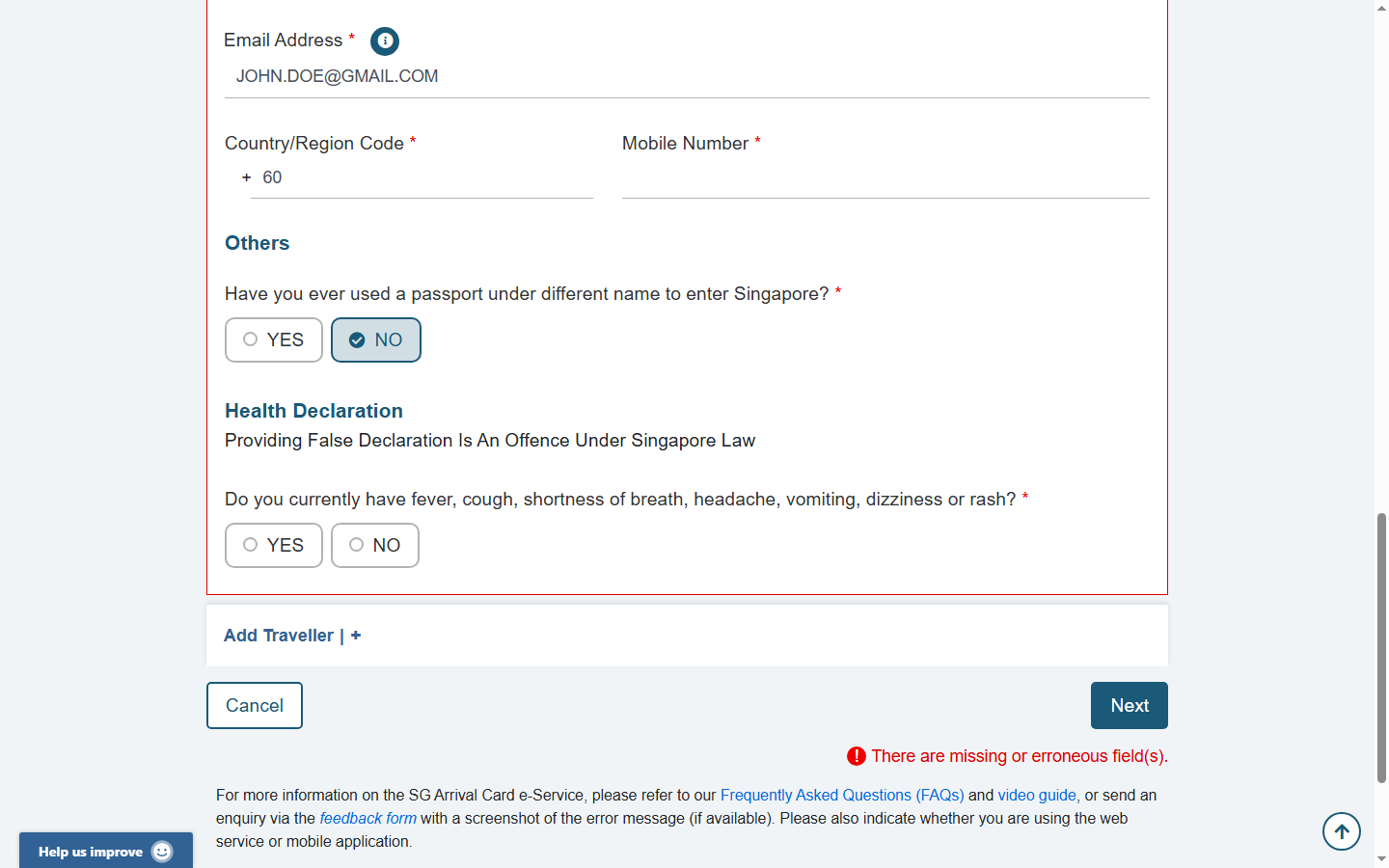
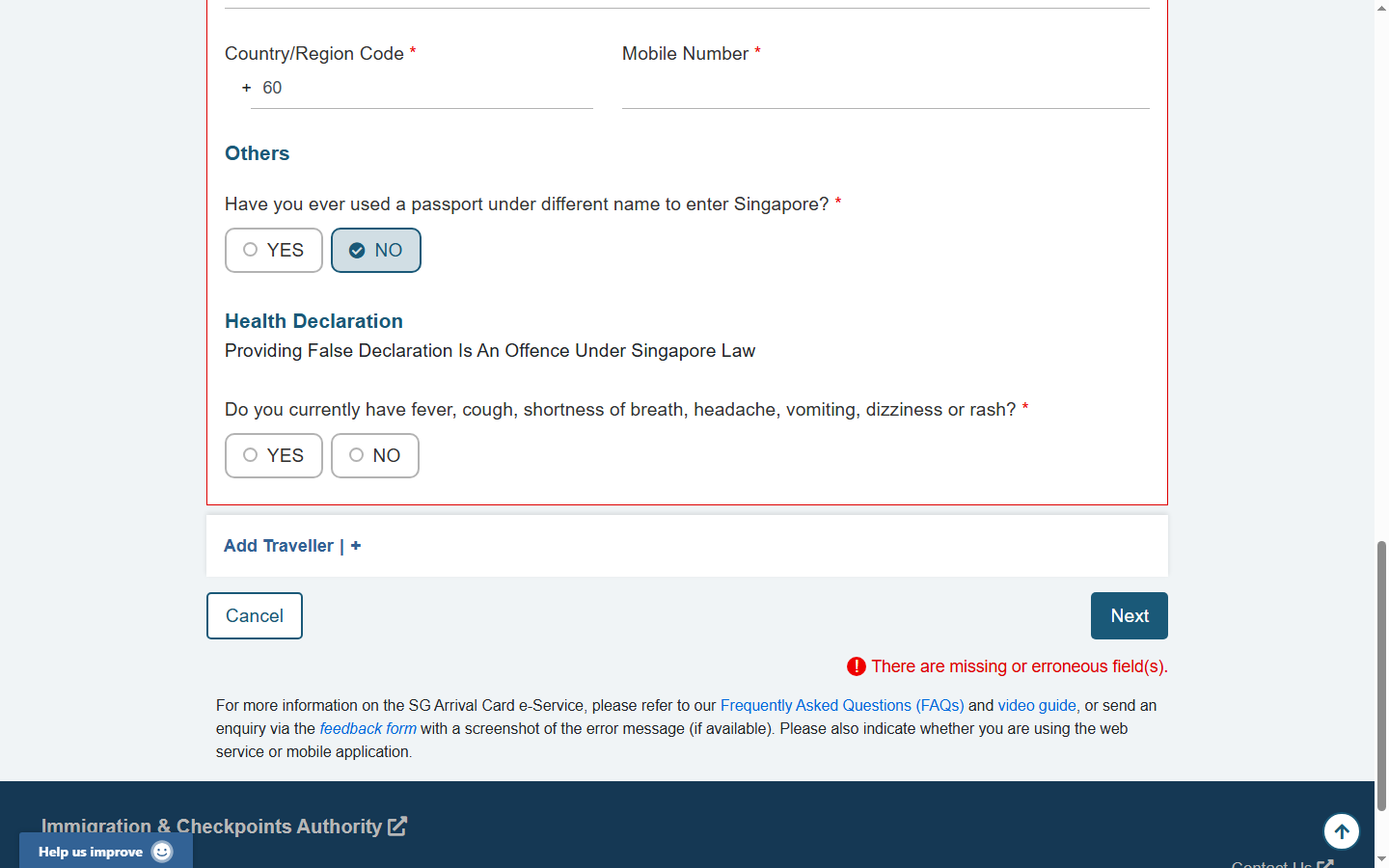
Health Declaration section heading on SGAC form
The Health Declaration section. Singapore law prohibits false health declarations β€” Providing False Declaration Is An Offence Under Singapore Law.
Health Declaration yes no question on SGAC form β€” empty
Health Declaration question β€” unanswered. You must select YES or NO.
Health Declaration question answered NO on SGAC form
Health Declaration β€” NO selected (healthy travellers with no symptoms).
⚠ Legal Warning: Providing a false health declaration is a criminal offence under Singapore law. If you have symptoms, select YES β€” you will not automatically be denied entry, but you may be required to undergo health screening at the checkpoint.
17

Review Completed Form β€” Before Clicking Next

Scroll back to the top and review all fields before clicking "Next". Check that your name, passport number, dates, and contact information are correct. Once submitted, changes require a new application.
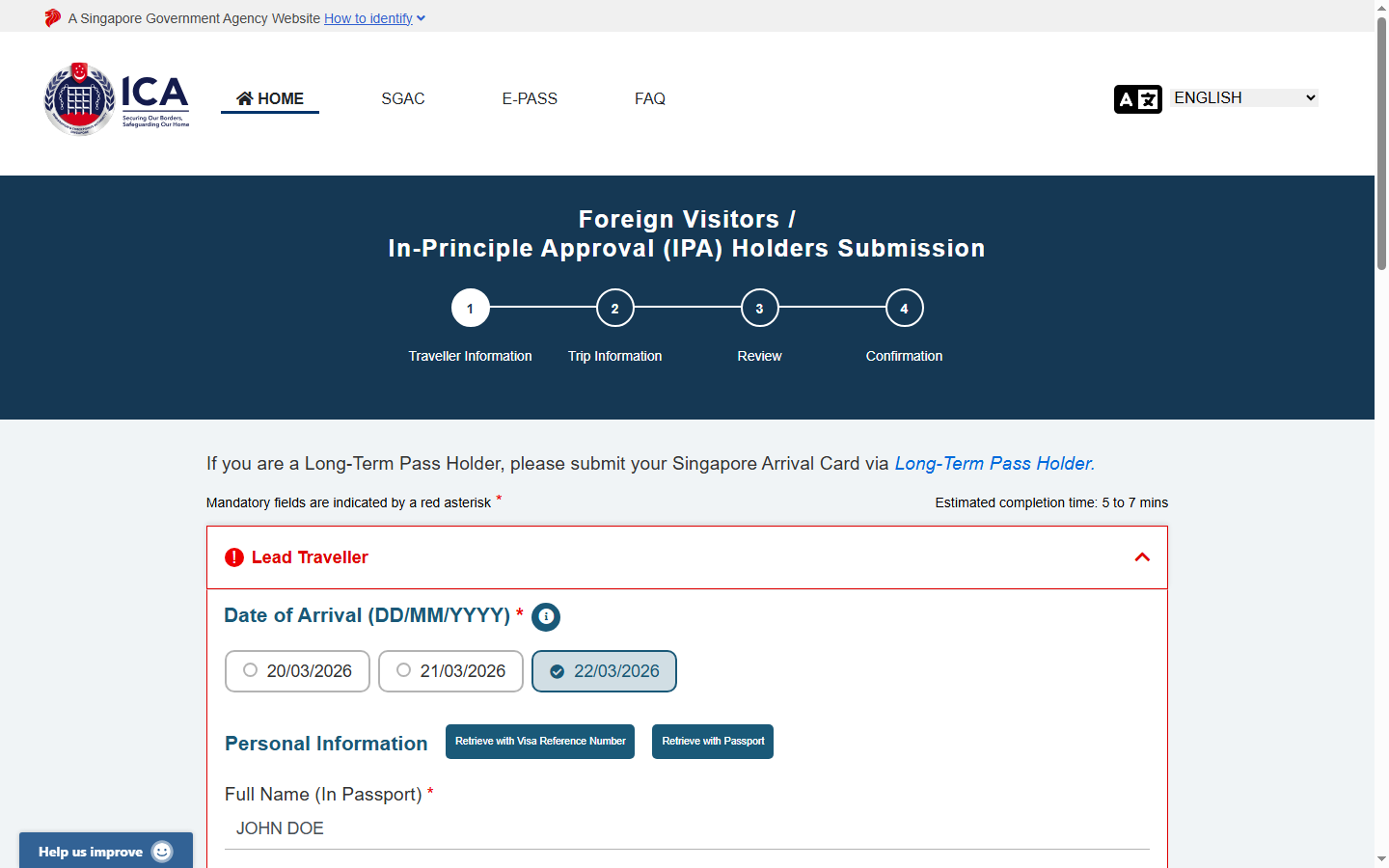
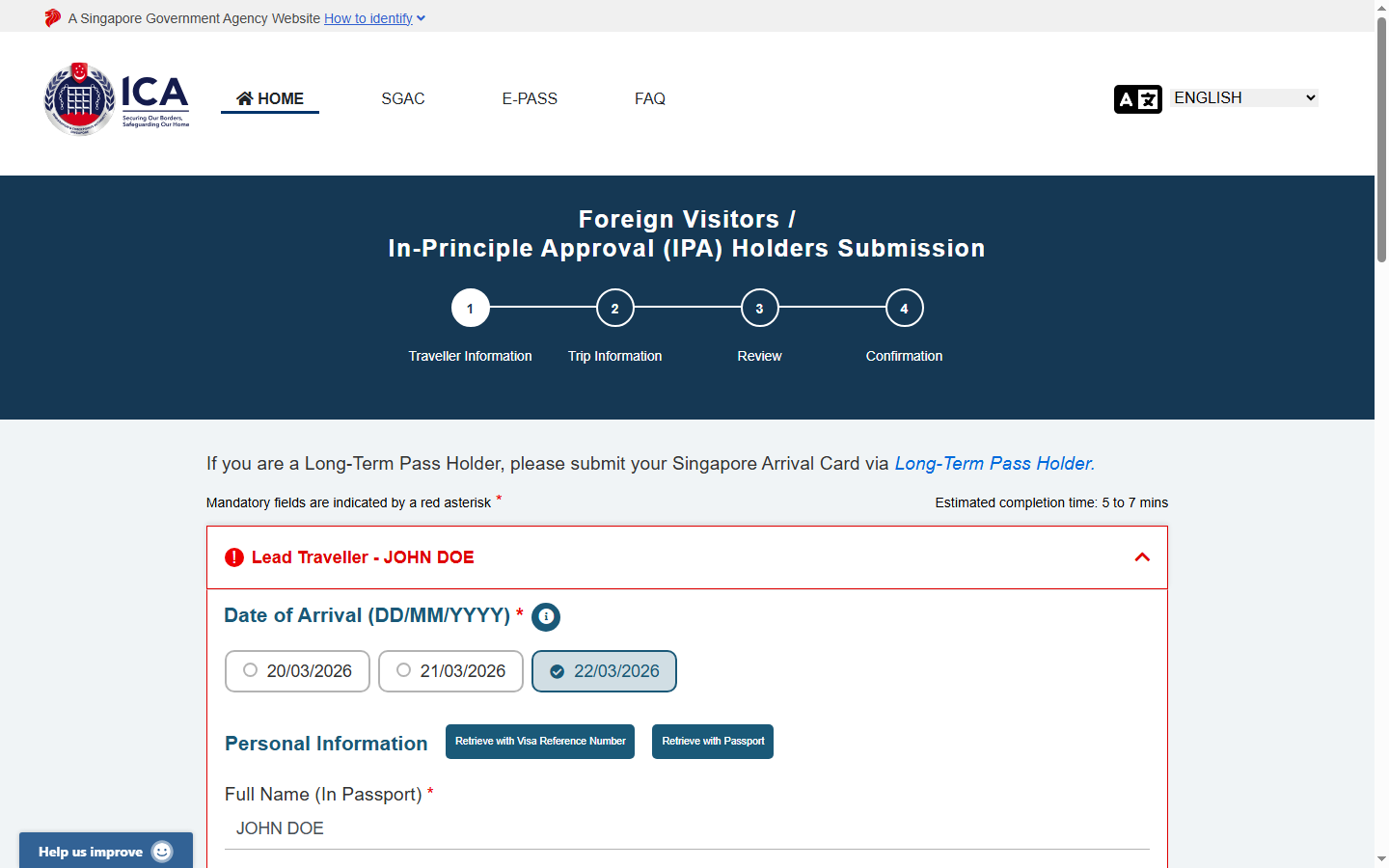
SGAC form Step 1 Traveller Information fully completed
Step 1 β€” fully completed. Review all fields, then click "Next" to proceed to Trip Information.

✅ Pre-Submit Checklist β€” Step 1

  • Arrival date matches your flight ticket
  • Full name exactly matches passport (including middle names)
  • Passport number is correct (no spaces, correct letter/number order)
  • Passport expiry date is correct and 6+ months from arrival
  • Date of birth is correct (DD/MM/YYYY format)
  • Nationality selected correctly
  • Email address is accessible and correctly typed
  • Health declaration answered honestly
18

Step 2: Trip Information

Step 2 asks for your travel and accommodation details. You will need your flight number, Singapore hotel address (or accommodation address), and port/mode of entry.
SGAC form Step 2 Trip Information page
Step 2 of 4: Trip Information. Enter your transport details, Singapore accommodation address, and last country visited.
🏠 Accommodation Tip: If staying at a hotel, enter the hotel's full name, street address, and Singapore postal code. If staying with friends or family, enter their full residential address. If you don't have accommodation confirmed yet, enter your best estimate β€” this can be updated by submitting a new SGAC.
✈ Flight Number Format: Enter your airline code followed by the flight number β€” e.g., SQ321 (Singapore Airlines), MH609 (Malaysia Airlines), EK432 (Emirates). Do not include spaces.
19

After Submission β€” What to Expect

After completing all 4 steps (Traveller Info β†’ Trip Info β†’ Review β†’ Confirmation), you will receive a confirmation email with a QR code. This is your proof of SGAC submission.

📧

Confirmation Email

Sent within minutes to your email address. Contains your SGAC reference number and QR code.

📷

QR Code

No printout needed. Immigration officers scan your QR code digitally at Changi Airport or other checkpoints.

📦

No Further Action

Once submitted, no further action is needed. Present the QR code (on phone or printed) when entering Singapore.

📷 Keep Your Email: Save or screenshot the confirmation email. If you don't receive it within 1 hour, check spam, or re-submit using a different email address. The SGAC is valid for the stated arrival date only.

Frequently Asked Questions β€” SGAC Application

How long does the SGAC form take to complete?

The Singapore Arrival Card form takes approximately 5–10 minutes for a single traveller with all documents ready. For group submissions (adding multiple travellers), allow 2–3 minutes per additional traveller.

Can I save my progress and return later?

No β€” the SGAC online form does not save partial progress. You must complete the entire form in one session. This is why gathering all required documents (passport, flight details, accommodation address) before starting is important.

What if I made a mistake in my SGAC submission?

If you notice an error after submission, you can submit a new SGAC application with the correct information β€” the latest submission will be used by immigration. Alternatively, use the "Update SGAC" option on the ICA portal to make corrections.

When should I submit the SGAC before arriving?

Submit your SGAC within 3 days (72 hours) before your planned arrival in Singapore. The ideal timing is 24–48 hours before departure. Submitting too early won't work as the portal only shows the next 3 dates.

Do I need to print the SGAC confirmation?

No printout is required. Immigration officers in Singapore scan your QR code digitally. You can show the confirmation email on your phone screen. However, having a screenshot or printed copy as backup is always helpful in case of phone battery issues.

Is the Singapore Arrival Card the same as a visa?

No β€” the SGAC is not a visa. It is a pre-arrival registration form. Singapore citizens of many countries can enter visa-free; others require a separate visa application. The SGAC is mandatory in addition to any visa requirements, not instead of them. Check Singapore's entry requirements separately.

Can someone fill in the SGAC on my behalf?

Yes β€” a designated third party (travel agent, family member) can submit the SGAC as a proxy. However, the traveller is legally responsible for the accuracy of all information. The ICA notes that the arrival card "will be taken to have been personally submitted by your principal."

What is the difference between the SGAC and the electronic Health Declaration Card (eHDC)?

The eHDC (electronic Health Declaration Card) is built into the SGAC β€” it's the health declaration section at the bottom of the Traveller Information form. You complete both in a single submission. There is no separate eHDC form. Learn more about the eHDC →

Ready to Apply for Your Singapore Arrival Card?

The official ICA e-Service is free, secure, and takes under 10 minutes. Apply within 3 days before your Singapore arrival.

Apply at ICA Portal β€” Free → Scam Warning